Mastering Your Feed with the Puspt Instagram Template: A Practical Guide for Creators
Scrolling through Instagram today feels less like browsing a photo album and more like navigating a high-stakes design gallery. Whether you are a small business owner trying to announce a flash sale, a lifestyle influencer curating an aesthetic feed, or a social media manager juggling five different client accounts, the pressure to produce visually stunning content is relentless. This is where tools like the Puspt Instagram Template come into play, not just as a shortcut, but as a strategic asset for maintaining consistency without burning out.
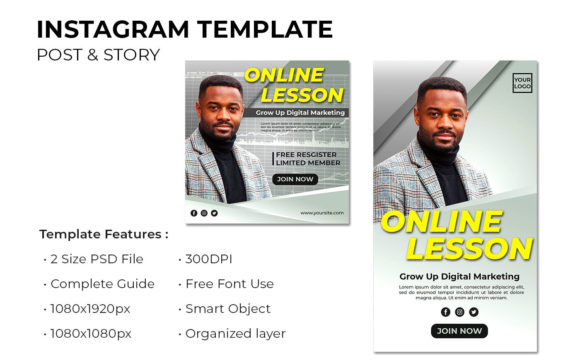
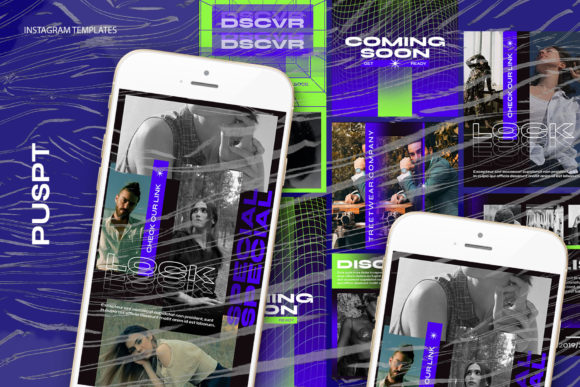
At its core, this template is a PSD (Photoshop) file designed to streamline the creation of square posts and stories. But describing it merely as a "file" misses the point of why it matters. It is a structured workflow that bridges the gap between amateur snapshots and professional branding. The template operates on a simple premise: you provide the vision and the photography, and the file provides the framework. With dimensions optimized for the platform—specifically 1200 x 1200 pixels for standard posts and 1920 x 1080 pixels for broader visual needs—it ensures that every pixel counts when displayed on a retina screen.
Real-World Scenarios Where Structure Saves Time
The true value of a tool like this isn't found in its technical specifications, such as being 300 DPI or RGB color mode, but in how it fits into the chaotic reality of content creation. Let's look at a few scenarios where this specific type of template changes the game.
Imagine you run a local boutique coffee shop. You have great photos of your new seasonal latte, but your feed looks disjointed because one day you used a bright filter, the next day a dark one, and the text fonts keep changing. By utilizing the Puspt Instagram Template, you establish a visual anchor. You can drop your new photo into the designated smart object, and instantly, it inherits the correct lighting balance and framing. The editable text layers allow you to swap "New Arrival" for "Weekend Special" in seconds. The result is a feed that looks cohesive and planned, even if you created the posts ten minutes before opening the shop.
Consider also the freelance photographer or digital artist. For these creatives, the portfolio is the product. They often struggle with the temptation to over-design their promotional posts, distracting from their actual work. This template offers a minimalist approach. Because the images are not included, the focus remains entirely on the user's photography. The smart object feature acts as a frame that respects the artwork rather than competing with it. When a potential client visits the profile, they see a grid that screams professionalism, not clutter.
The Mechanics of Efficiency: Smart Objects Explained
One of the most intimidating aspects of Photoshop for many users is the layer panel. However, the genius of this template lies in its use of Smart Objects. This isn't just a fancy term; it's a functional lifesaver. In traditional editing, resizing an image repeatedly degrades its quality, making it pixelated and blurry. With the smart object workflow embedded in this file, you simply double-click the layer icon within the image group. This action opens a separate window where you place your image. Once you save (CTRL+S), the main template updates automatically.
This process preserves the original resolution of your photo. Whether you are working with a high-end DSLR shot or a crisp smartphone photo, the template ensures it renders at the optimal 300 DPI quality before being exported for web use. For the non-designer, this means you don't need to worry about compression algorithms or resizing math. You just plug and play. The "Easy to use" claim isn't marketing fluff here; it's a reflection of a workflow that removes technical friction so you can focus on creativity.
Tailoring the Tool to Different Industries
Different sectors leverage these templates in unique ways, proving their versatility beyond simple photo sharing.
- E-Commerce Brands: For online stores, consistency builds trust. Using the editable text tools, brands can create a series of posts for a product launch where the layout remains identical, but the product image and price tag change. This creates a recognizable pattern in the user's feed, signaling a campaign rather than random posts.
- Coaches and Consultants: Thought leaders often share quotes or tips. The text-editable nature of the file allows them to batch-create a month's worth of content in one sitting. They can cycle through different background images while keeping the typography consistent, reinforcing their personal brand identity.
- Event Planners: When promoting weddings or corporate events, the aesthetic must match the event's theme. The ability to tweak colors and swap images instantly allows planners to mock up concepts for clients quickly, using the template as a presentation tool as much as a publishing one.
Considerations Before You Commit
While the benefits are clear, it is important to approach this tool with a realistic mindset. First, remember that images are not included. This is a common point of confusion for beginners who expect a "done-for-you" pack with stock photos. This template is a vessel; you must bring the content. If you do not have high-quality photography, the template cannot magic it into existence. The 1200 x 1200 px canvas is only as good as the source material you place inside it.
Secondly, while the file is "easy to use," it does require access to Adobe Photoshop. If your workflow is entirely mobile-based using apps like Canva or Lightroom Mobile, you will need to adapt or find a way to access desktop software to utilize the PSD features fully. The reliance on smart objects is a desktop-centric workflow. However, for those willing to make the switch, the control gained over typography and layering is unmatched by mobile-only solutions.
There is also the aspect of customization. The template provides a structure, but there is a risk of looking too similar to others if the default settings are never tweaked. The savvy user will take the base file and adjust the font weights, shift the color overlays, or crop the smart object masks slightly to create a signature variation. The goal is to use the template as a foundation, not a crutch.
Making the Most of the Editable Features
The fact that all text is editable with the text tool is perhaps the most underutilized feature. Many users treat the text as static, changing only the words. However, you have the freedom to change the font family, tracking, leading, and color to match your evolving brand guidelines. If your brand moves from a serif-heavy aesthetic to a bold sans-serif look, this file adapts instantly. You aren't locked into a specific style forever.
Furthermore, the RGB color mode ensures that what you see on your screen is vibrant and ready for digital consumption. Unlike CMYK files meant for print, this template is optimized for the backlit screens of smartphones and tablets. This attention to color space prevents the dullness that sometimes occurs when print-designed assets are repurposed for social media.
In the fast-paced world of social media, agility is everything. The Puspt Instagram Template offers a blend of structure and flexibility that caters to both the novice looking for guidance and the pro looking for speed. It removes the blank canvas anxiety and replaces it with a streamlined production line. By understanding how to leverage its smart objects, respecting the need for your own high-quality imagery, and customizing the text elements to fit your unique voice, you transform a simple PSD file into a powerful engine for growth. It's not just about making a pretty picture; it's about building a sustainable system for showing up consistently in a crowded digital space.