Elevate Designs with Watercolor Vector Brush Stroke
In the fast-paced world of digital design, there is a growing hunger for textures that feel human. While sleek gradients and perfect geometric shapes have their place, they often lack the soul found in traditional media. This is where the Watercolor Vector Brush Stroke becomes an indispensable tool for modern creators. Unlike standard raster images that pixelate when enlarged, these assets combine the organic, fluid beauty of hand-painted watercolors with the mathematical precision of vector graphics. The result is a versatile resource that allows designers to inject warmth, authenticity, and artistic flair into projects without sacrificing scalability or clarity.
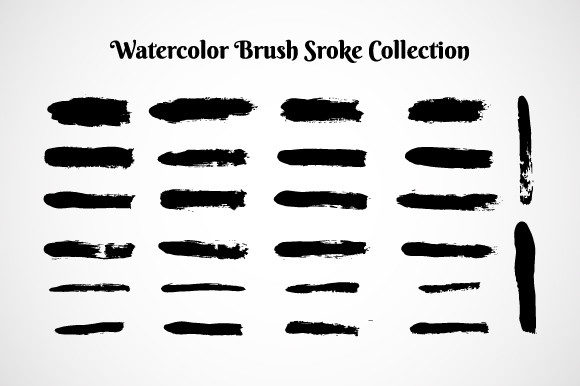
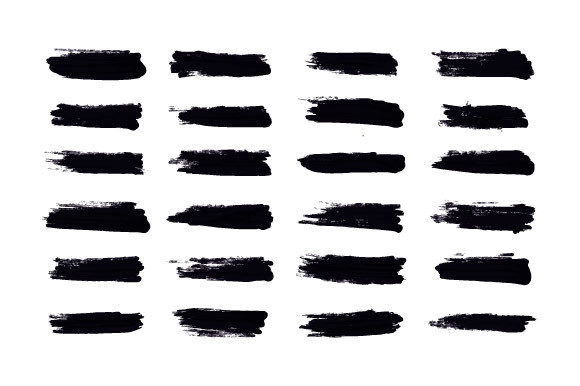
The specific appeal of a high-quality, handmade set lies in its origin. When brush strokes are traced from real paintings at around 600 dpi, they retain the subtle nuances of the medium—the way pigment pools at the edges, the varying opacity where the brush lifted, and the natural grain of the paper. These are not algorithmic simulations; they are digital captures of genuine artistic expression. For professionals working across print and web, this duality is powerful. You get the emotional resonance of watercolor with the technical flexibility of an .AI file, ensuring your work looks crisp on a business card or a billboard.
The Technical Advantage of Hand-Traced Vectors
Many designers hesitate to use textured elements because they fear file bloat or resolution issues. However, a properly constructed Watercolor Vector Brush Stroke solves these problems elegantly. Because the source material is handmade and then meticulously traced, the paths are clean and optimized. This means you can recolor the strokes instantly to match any brand palette without losing the texture's depth.
Consider the workflow efficiency. In a typical project, a designer might spend hours trying to create a custom watercolor effect using complex masks and transparency settings. With a dedicated brush set, that time is reduced to seconds. You simply drag, drop, and adjust. The included vector file .AI format ensures compatibility with industry-standard software, allowing for seamless integration into logos, illustrations, and layout compositions. This practicality frees up mental energy, letting you focus on the creative concept rather than the technical execution.
Applications Across Creative Industries
The versatility of these brush strokes opens doors for a wide range of applications. Here is how different professionals can leverage them to enhance their output:
- Brand Identity Designers: Use soft, bleeding edges to humanize corporate logos. A tech startup might use a sharp sans-serif font paired with a vibrant watercolor splash to suggest innovation grounded in creativity.
- Social Media Managers: Create eye-catching story highlights or post backgrounds that stand out against the sea of flat, digital graphics. The organic shape draws the eye naturally.
- Packaging Specialists: Add a premium, artisanal feel to product labels. Whether it is for organic skincare or craft coffee, watercolor textures signal quality and care to the consumer.
- Educators and Publishers: Break up dense text in textbooks or worksheets with friendly, colorful accents that make learning materials more approachable and engaging for students.
- Wedding Planners and Stationers: Craft invitations and save-the-dates that feel bespoke and romantic, utilizing the delicate nature of watercolor to evoke emotion.
Strategies for Effective Implementation
While having access to beautiful assets is a great start, knowing how to apply them effectively separates amateur designs from professional work. The key is balance. A Watercolor Vector Brush Stroke should support the message, not overwhelm it. When incorporating these elements, consider the hierarchy of your design. If the text is the primary focus, use the brush strokes as subtle underlays or corner accents. If the visual impact is the goal, let the strokes take center stage while keeping typography minimal and legible.
Color theory plays a crucial role here. One of the greatest benefits of vector formats is the ability to shift hues effortlessly. However, just because you can change the color doesn't mean you always should. Sometimes, retaining the original, hand-mixed tones provides a level of realism that solid colors cannot mimic. Experiment with blending modes in your design software. Setting a watercolor layer to "Multiply" can allow it to interact naturally with background textures, while "Screen" can create luminous, ethereal effects suitable for light-themed projects.
Maintaining Consistency and Originality
A common pitfall when using stock assets is making every project look the same. To avoid this, treat the brush set as a raw material rather than a finished solution. Combine different strokes from the set to create unique compositions. Rotate, scale, and mirror the elements to build new shapes that haven't been seen before. For instance, overlapping several light blue strokes can create the illusion of a cloud or a wave, while clustering warm tones might suggest a floral arrangement.
Furthermore, adapt the style to your specific audience. A design for a children's book might utilize bright, saturated strokes with playful arrangements. In contrast, a financial report might use muted, desaturated washes to add visual interest without compromising professionalism. The Watercolor Vector Brush Stroke is neutral enough to be molded to fit these diverse contexts, provided the designer applies intentionality to their choices.
Practical Inspiration for Your Next Project
If you are looking for immediate ways to integrate these tools, consider starting with a personal branding kit. Create a set of social media templates where each post features a unique watercolor element that aligns with your brand colors. This creates a cohesive visual language that followers will instantly recognize. Alternatively, try designing a series of quote graphics. Place inspirational text over a soft, abstract watercolor background to create shareable content that resonates emotionally with viewers.
For those in the e-commerce sector, think about product photography enhancement. Instead of placing products on a plain white background, use a subtle watercolor wash behind the item to give it context and depth. This technique works particularly well for lifestyle products, suggesting how the item fits into a creative or relaxed environment.
Ultimately, the value of a handmade, high-resolution brush set lies in its ability to bridge the gap between the digital and physical worlds. It reminds the viewer that behind every screen and every pixel, there is a human touch. By mastering the use of these Watercolor Vector Brush Stroke assets, you equip yourself with the power to tell richer stories, build deeper connections, and produce work that stands out in a crowded digital landscape. The tools are ready; the only limit is your imagination.