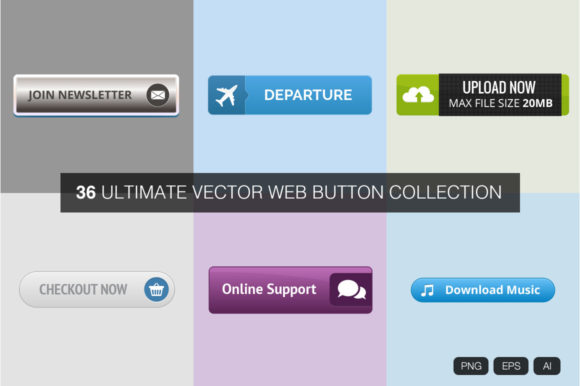
Elevate Your UI with a Versatile Web Button Collection
In the fast-paced world of web design, the difference between a user bouncing off a page and converting often comes down to the smallest details. While layout, color theory, and typography set the stage, it is the interactive elements that drive action. A Web Button Collection serves as the essential toolkit for designers and developers who understand that a call-to-action (CTA) is more than just a shape; it is an invitation. Whether you are building a landing page for a startup, refining an e-commerce checkout flow, or adding flair to a personal portfolio, having access to a diverse library of vector-based buttons can drastically reduce production time while elevating the visual quality of your project.
The true value of a comprehensive button library lies in its flexibility. Static images often fail when scaled across different devices, leading to pixelation and a loss of professional polish. This is why modern resources prioritize vector formats. With a collection offering files in EPS 10 and AI, you gain the ability to resize any element from a tiny mobile icon to a massive hero banner without losing a single ounce of crispness. This scalability ensures that your design remains sharp on 4K monitors and retina displays alike, maintaining brand integrity regardless of the viewport.
The Power of Vector Scalability and Format Variety
When selecting assets for a professional project, file format is not just a technicality; it is a workflow necessity. A robust collection typically includes four EPS 10 files and four AI files, covering the entire spectrum of thirty-six unique designs. For Adobe Illustrator users, the native AI files allow for deep customization. You can easily adjust anchor points, modify gradients, or swap out colors to match a specific brand palette instantly. The EPS 10 format ensures compatibility with a wider range of vector editing software, making these assets accessible even if you are not strictly within the Adobe ecosystem.
Beyond the editable vectors, practicality demands ready-to-use raster images for quick prototyping or web implementation where code-based styling is preferred over image assets. Including thirty-six PNG files with transparent backgrounds provides immediate utility. These files, typically ranging around 200 to 300 pixels in width, are optimized for standard web use cases. They load quickly and integrate seamlessly into HTML structures without requiring complex CSS shading or boxing, although they serve best as references or fallbacks. The combination of editable vectors and ready-made PNGs creates a hybrid workflow that supports both rapid iteration and high-fidelity finalization.
Exploring Style Variations for Diverse Projects
A generic "one-size-fits-all" approach rarely works in modern interface design. Users today expect visual cues that align with the context of the content. A high-end luxury brand requires a different tactile feel than a playful gaming community or a serious financial institution. A well-curated Web Button Collection addresses this by offering significant stylistic variation. You might find sleek, flat designs with subtle shadows for minimalist SaaS platforms, alongside bold, glossy, or textured options for entertainment sites.
Consider the psychological impact of shape and depth. Rounded corners often convey friendliness and approachability, making them ideal for social platforms or educational tools. Sharp, rectangular edges suggest precision and authority, fitting for legal or corporate sectors. By having thirty-six distinct options at your disposal, you can A/B test different styles to see which resonates most with your audience. Perhaps a gradient-filled button increases click-through rates for your newsletter signup, while a solid, outlined button performs better for secondary actions like "Learn More."
Practical Applications Across Industries
The utility of such a collection extends far beyond simple website navigation. Creators and entrepreneurs can adapt these assets for a multitude of digital products. For instance, email marketers can embed these high-quality PNGs directly into HTML emails to create visually distinct CTAs that stand out in crowded inboxes. Since the images have transparent backgrounds, they blend perfectly with any email template background color or pattern.
Freelancers and agency owners will appreciate the time-saving aspect. Instead of spending hours crafting a perfect bevel or shadow effect from scratch for every new client, you can select a base style from the collection and tweak it in minutes. This efficiency allows you to focus more on strategy and user experience rather than repetitive graphic tasks. Educators creating online courses can use these buttons to mark module completions or download links, providing students with clear, consistent visual markers throughout their learning journey.
Furthermore, app developers working on hybrid projects can use the vector files to generate assets for multiple screen densities. Because the source files are vector-based, exporting @2x or @3x versions for iOS and Android becomes a trivial task, ensuring your interface looks native on every device.
Maintaining Consistency and Usability
While variety is a strength, consistency is the key to usability. When integrating a Web Button Collection into your project, it is crucial to establish a hierarchy. Do not use all thirty-six styles on a single page. Instead, select one primary style for your main conversion goals—such as "Buy Now" or "Sign Up"—and perhaps one secondary style for less critical actions. This visual distinction guides the user's eye and prevents decision paralysis.
Accessibility should also remain a priority. Even the most beautiful button fails if users cannot interact with it. Ensure that whatever style you choose maintains sufficient contrast against the background. If you are using the PNGs, verify that the text within the graphic is legible. If you are using the vector files to build CSS buttons, ensure the hover and active states provide clear feedback. The goal is to enhance the user experience, not to obscure it with overly ornate designs that confuse the interface.
Tips for Customization and Integration
To get the most out of your asset library, treat the provided files as a foundation rather than a final destination. Here are a few ways to maximize their potential:
- Color Adaptation: Use the AI files to globally swap colors. If your brand identity changes, you can update the entire set of buttons in seconds rather than redesigning them individually.
- Texture Overlay: Since the vectors are clean, you can easily apply noise textures or grain overlays in your design software to give the buttons a retro or organic feel that matches current design trends.
- Animation Prep: The clean layers in the EPS and AI files make it easy to export components for motion graphics. You can separate the background shape from the text or icon to create engaging micro-interactions using CSS or JavaScript.
- Responsive Testing: Always test your chosen buttons on mobile devices. A style that looks balanced on a desktop monitor might appear cramped on a smartphone screen. The vector nature of the files allows you to adjust padding and proportions specifically for mobile views.
Ultimately, the goal of utilizing a pre-made collection is to accelerate your creative process without sacrificing quality. By leveraging these thirty-six varied, vector-based designs, you equip yourself with the flexibility to tackle any project requirement. Whether you are a hobbyist launching a blog or a seasoned marketer optimizing a sales funnel, having a reliable, scalable, and stylish set of interactive elements allows you to focus on what truly matters: connecting with your audience and driving results.
Embrace the freedom that comes with high-quality resources. Let the technical heavy lifting of vector creation happen once, so you can spend your energy on innovation, storytelling, and building digital experiences that resonate. With the right tools, even the smallest element on your page can become the catalyst for your project's success.